|
Stage |
What to count |
What it tells us |
|---|---|---|
|
Visit |
Relevant sessions to priority service pages |
Whether the right people are reaching the right page |
|
Contact action |
Calls connected, completed forms, booking requests |
Whether visitors are taking a measurable next step |
|
Qualified inquiry |
Requests that fit your service, location, and capacity |
Whether the inquiry is a real opportunity |
|
Booked |
Confirmed appointments, estimates, or jobs |
Whether the business outcome is happening |
|
Completed / won |
Visits completed, jobs sold, or revenue where available |
Whether the bookings produce value |
Turn Website Visitors into Booked Jobs and Appointments
Your website can attract the right people and still leave them unsure what to do next. A visitor may be comparing providers, checking whether you serve their area, trying to understand the price, or looking for the fastest way to book. If the page does not answer the question they came with, another call-to-action button may not fix the problem.
To turn website visits into business, connect the whole path: the right visitor needs a relevant page, enough information to choose, a simple way to contact or book, and a reliable response after they act. A tap on a phone number or a submitted form is a useful signal. It is not yet a booked job.
Measure what happens after that first action. Check whether the inquiry fits your service, someone responds, and the job or appointment is confirmed. This can reveal where potential customers are dropping out: an unanswered call, an unclear estimate process, or a missing confirmation.
Key takeaways
Match each page to the service and intent that brought the visitor.
Answer customer questions and place relevant proof near the next step.
Make calling, requesting an estimate, or booking straightforward, then follow up reliably.
Track qualified inquiries through to confirmed jobs or appointments.
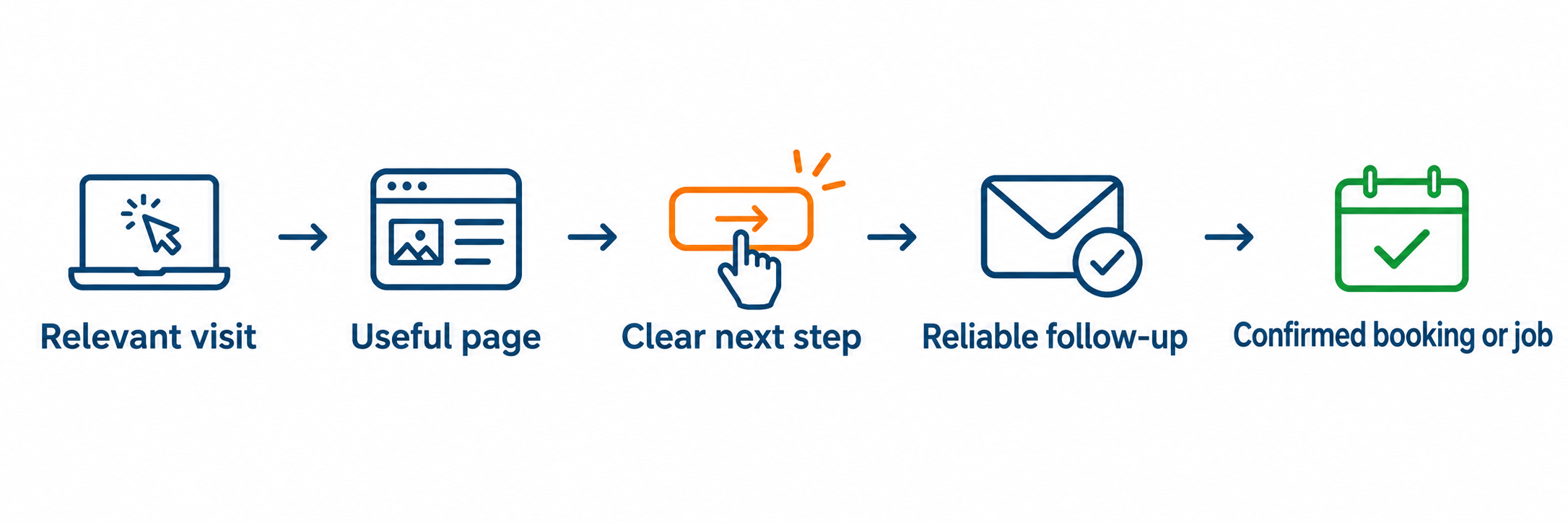
Start by deciding what a “conversion” means for your business
A conversion is a customer action you can observe, but businesses do not all need the same action. A home-services company may want a qualified estimate request. A veterinary clinic may want a new-client appointment. A med spa may want a consultation for a specific treatment. A specialist may need a conversation before anyone can book.
Write down the result you want before changing the page. For example:
Home service: a homeowner in your service area requests an estimate for a service you provide.
Appointment business: a new or returning customer books the right service at an available time.
Consultative service: a suitable prospect schedules an initial conversation with the right person.
Then distinguish the steps that lead to that result. A phone-button click is not necessarily a connected call. A form submission is not necessarily a qualified lead. An appointment request is not necessarily a confirmed appointment. Keep those stages separate in your reporting.
1. Match the page to the reason the visitor came
A person who searched for “emergency furnace repair” should not have to work through a general company introduction to find out whether you take urgent calls. Someone looking for a first veterinary visit needs different information from a client looking for a specific treatment.
Use the page that best answers the search, ad, referral, or email that brought the visitor. Carry the same service name, location, offer, and expectation through to the page. If a paid ad promises a consultation, the landing page should explain that consultation and make it easy to request one.
A useful page makes these points clear near the start:
What service is available?
Who is it for, and what problem does it address?
Which locations or service areas are covered?
What should the visitor do next?
Some services merit a dedicated page when they have distinct customer needs, processes, or questions. The service-page vs. location-page comparison explains how to decide what belongs on each.
2. Answer the questions that hold up a decision
People contact a business when they understand what will happen and feel that the next step is worth taking. A short service list rarely gives them enough to decide. On the pages that matter most, explain the parts of the service a customer needs to evaluate:
What is included, and what is not?
What happens after someone calls, submits a request, or books?
How long does the service or first appointment usually take?
What affects the price? Can you share a starting price, range, or estimate process?
What should a customer prepare, bring, or expect?
Are there eligibility, availability, coverage, or scheduling limits?
Be specific where you can and honest where you cannot. If each job is different, explain what determines the estimate and how quickly someone can expect an answer. If availability changes, say how customers can check it. Clear expectations help people decide whether to contact you and help your team handle the inquiry that follows.
The 10-part search visibility checklist can help you spot where customers may get stuck before they contact you.
3. Put relevant proof beside the decision
A visitor may be comparing your business with providers they have never met. Give them real reasons to trust the service you are offering, close to the information and action that matter.
Useful proof can include a review about that service, a real project photo, relevant credentials, a named team member, a clear warranty or policy, or an example that shows how the work was handled. Explain why the proof is relevant. A review about a quick response may matter to an emergency customer; a review about careful explanations may matter to someone considering a treatment or consultation.
Use proof you can verify and have permission to share. Do not imply that every customer gets the same result, and do not present a general rating as evidence for a specific claim it does not support. A real, modest example is more useful than a broad promise that could describe any provider.
4. Choose the next step that fits the service
“Contact us” leaves the visitor to decide what contact means. Choose a clear main action that matches how the service is bought:
For urgent or time-sensitive work: make the phone number easy to find and tap on a mobile device, and state when calls are answered.
For scheduled appointments: offer online booking if your team can keep availability accurate; explain what is confirmed and what still requires approval.
For estimates or custom work: offer a short request form and say what information helps you prepare the next step.
For services that need a conversation first: let visitors request a consultation or choose a time to talk.
A page can offer another contact route for people who need it, but keep one action visually primary. Give buttons concrete labels such as “Request an estimate,” “Book a new-patient visit,” or “Call about emergency service.” The action should lead directly to the promised call, form, or booking step, not make the visitor search for it again.
5. Make the form easy to finish, not just easy to find
Ask for the information your team needs to respond and route the inquiry. Often that is a name, a preferred way to reply, the service needed, and a short optional description. Some businesses need a location, appointment type, or a few details to confirm fit. Add those fields when they change what happens next; avoid turning the first contact into a full intake process.
A few practical checks:
Mark required fields clearly and use labels people understand.
Let visitors know what happens after they submit the form.
Make the submit button describe the action, such as “Request my estimate.”
Check that the form works on a phone and that error messages explain how to fix a problem.
Send the inquiry to an inbox or system someone actively monitors.
Do not ask for sensitive information in a general contact form unless the process requires it and the form is designed to collect it appropriately. Collect the minimum needed to begin the conversation, then gather additional details through the right channel.
6. Treat the response after contact as part of the customer journey
The website can create an opportunity, but your follow-up helps turn it into a booking or job. Decide who owns new inquiries, how they are notified, and what the customer should expect next. Test the path yourself: submit the form, call the listed number, and try the booking flow outside business hours.
Confirm that the visitor’s request arrived. Set a realistic response expectation and meet it. If a call is missed, make sure there is a clear callback process. If someone requests an appointment, explain whether the time is confirmed immediately or whether your team will confirm it. These small operational details prevent the page from promising a smoother process than the business can deliver.
7. Measure progress all the way to booked work
Track more than button clicks. A simple service-business path might look like this:
For example, if 1,000 relevant visits produce 25 qualified inquiries and 10 confirmed bookings, the visit-to-booking rate is 1%. That example is only a way to show the calculation, not an industry benchmark. Keep calls, forms, and bookings distinct, and be careful not to count several actions from one person as several customers.
Review the numbers by service, landing page, traffic source, and device when you have enough data to do so. If phone-button clicks rise but connected calls do not, inspect the phone experience. If forms arrive but few are suitable, check the page promise, targeting, and service-area information. If qualified inquiries do not become bookings, review response time, availability, estimate clarity, and follow-up. The location of the drop-off tells you what to investigate next.
A call and form tracking setup helps you compare those actions with confirmed bookings without expensive tools.
A practical 30-day improvement plan
Days 1–3: Test the main pages on a phone. Record the current page visits, calls, form submissions, bookings, and known lead quality. Ask the person answering inquiries where customers seem confused.
Week 1: Choose one high-value service page and fix the biggest confirmed barrier: unclear service area, missing decision information, weak proof, a broken action, or an unreliable form.
Weeks 2–3: Check that calls and forms reach the right person. Review real inquiries and booking outcomes. Note what changed and what customers still ask.
Week 4: Compare the same measures with your starting point. Keep the change if the evidence supports it; adjust or test the next most likely problem if it does not.
A small business may not have enough visits to run a reliable split test on every page change. You can still improve with a careful mobile review, customer questions, call records, form quality, and before-and-after results. Change one important thing at a time where possible so you can tell what may have helped.
Quick diagnosis: where might the path be breaking?
|
What you notice |
Check this first |
|---|---|
|
Visitors leave the service page without contacting you |
Does the page answer the service, area, price or process questions they need before reaching out? |
|
Many calls or form submissions are a poor fit |
Does the page clearly state who you serve, which jobs you take, and where you work? |
|
People click the phone number but few calls connect |
Test the number on mobile and compare click counts with your call log. |
|
Good inquiries arrive but bookings stay low |
Review response ownership, availability, estimate steps, and what happens after first contact. |
|
Bookings come in but people do not attend or proceed |
Check confirmation, reminders, cancellation information, and whether the original page set accurate expectations. |
Frequently asked questions
What is a good website conversion rate for a service business?
There is no single useful target for every service, location, price point, and traffic source. First define whether you are measuring a call click, a connected call, a qualified inquiry, or a confirmed booking. Then compare your own results over time and by service or channel.
Should I focus on more website traffic or better conversion?
Check both the quality of the visits and what happens after people arrive. If the page receives relevant visitors but few take the next step, investigate the page and contact path. If few relevant visitors arrive, visibility and targeting also need attention. More traffic alone will not repair a broken booking process.
Should every service have a separate page?
Create a dedicated page when the service has distinct customer questions, search intent, process, or proof and you can make the page genuinely useful. Closely related services can often share one well-organized page.
Do I need online booking?
Only if customers can choose a useful time and your team can keep availability current. If each request needs review, use a clear appointment-request or consultation step and explain when it becomes confirmed.
What should I fix first?
Start with the most important service and the clearest point of failure. Verify the page promise, mobile experience, contact route, inquiry delivery, and follow-up before investing in a redesign or adding more tools.
Make the next step easier to take
A website turns more of the right visits into business when it helps customers understand the service, see relevant proof, take a clear next step, and receive a dependable response. Then your tracking should follow that journey through to qualified inquiries and confirmed work.
If you are unsure whether people can find, understand, and contact your business from search, request a free Search Visibility Snapshot. It gives independent service businesses an outside-in view of visible search and website signals, including whether the path to an inquiry is clear.