Your Google Business Profile Is Visible. Why Isn't It Producing Calls?
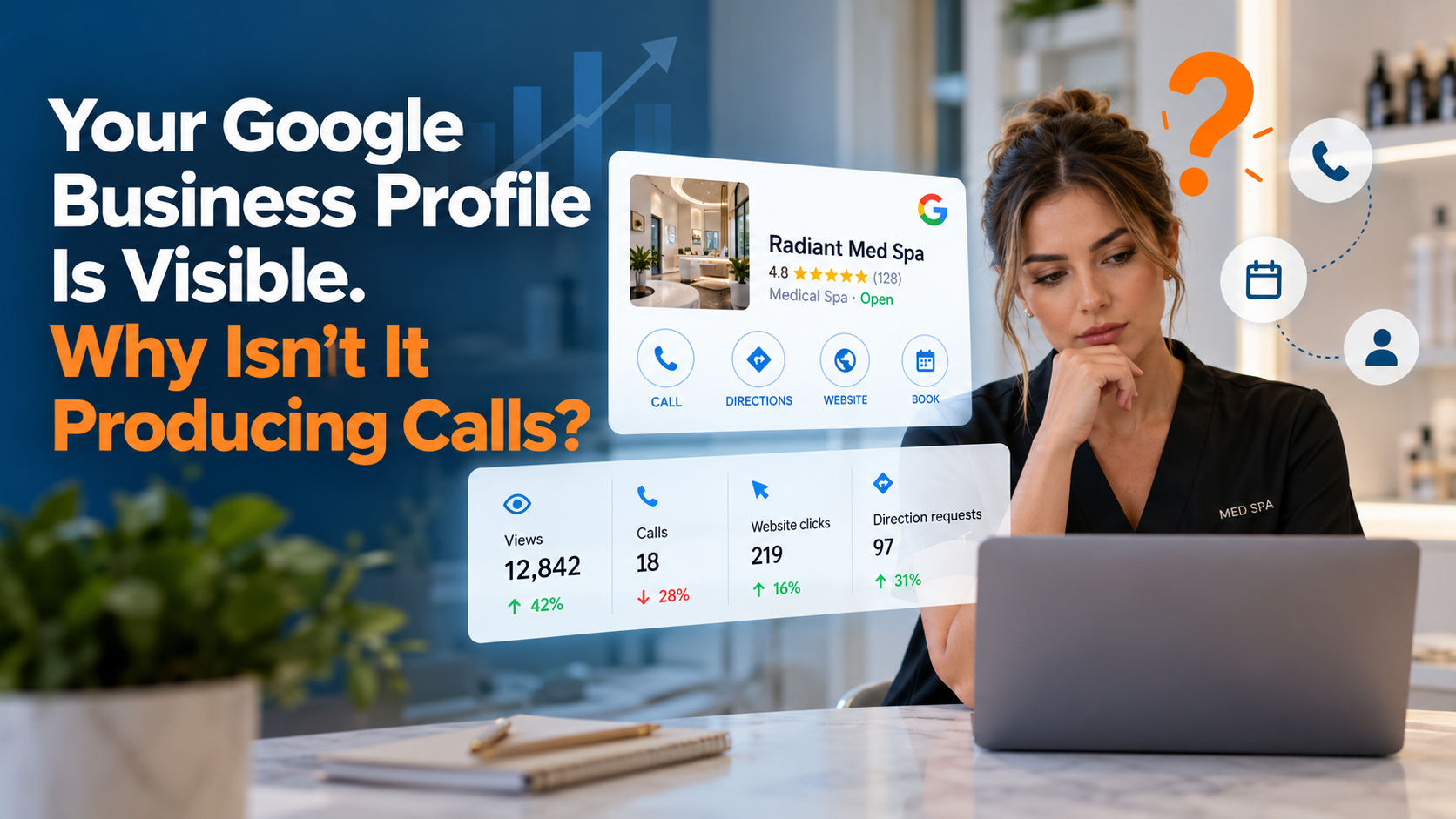
Your Google Business Profile can receive plenty of views and still bring in few calls. The reason may be the searches bringing people to your listing, what they see when they find it, how easy it is to contact you, or what happens after they reach out. Some people also book online without calling.
For a med spa or wellness practice, the useful question is: Where are potential clients getting stuck between finding us and booking?
Imagine a med spa owner reviewing the monthly numbers. Profile views are up. Treatment rooms have openings. The phone seems quiet. It is tempting to assume Google is sending the wrong people or that the profile needs more photos. Either could be true. So could a slow booking form, missed calls, or a website that never explains what a first consultation involves.
The right fix depends on the point where interest stops turning into action.
What Google Business Profile views actually tell you
A view means your Business Profile appeared to someone on Google Search or Maps under Google's reporting rules. It does not mean that person read your services, wanted an appointment, or even considered calling.
Google Business Profile Performance can show interactions such as calls, website clicks, direction requests, and, where supported, bookings. These figures describe actions on the profile. They are not a complete record of your practice's new clients.
For example, the calls metric counts clicks on the call button. It cannot tell you whether your receptionist answered, whether the caller wanted a treatment, or whether a consultation was booked. A person might also copy your number, visit your website, or contact you later through another route.
That means a rise in views alongside flat call clicks is a useful signal, not a final diagnosis.
Google explains these measures in its Business Profile performance documentation.
Seven reasons your profile gets seen but produces few inquiries
1. Your practice appears for searches that do not lead to appointments
People search at different stages. “What is microneedling?” often signals research. “Microneedling consultation near me” may signal someone closer to choosing a provider. Both can lead to a profile view, yet they carry different levels of intent.
A wellness studio might appear for general searches about massage, stress relief, or skin care. Some searchers want advice, prices, directions, or opening hours. Others are comparing providers. Only some are ready to contact a practice now.
What to check: Review the search terms available in your Business Profile performance report. Compare them with the services that actually generate appointments. Then check how your practice appears for a few important services from different parts of your service area. Search results vary by location, so one search from your office is not enough.
2. Your profile does not make your services clear
“Medical spa” or “wellness center” describes a business category. It does not answer a person's next question: Do you offer the treatment I am looking for?
Suppose someone is considering laser hair removal. If the profile has generic photos and a broad description but little service information, the person may keep comparing other practices.
What to check: Confirm that your primary category fits your business, and that your services are accurate and specific. Make it easy to understand which treatments are available and where they are offered. Do not add services or categories simply to catch more searches.
Google identifies relevance, distance, and prominence as its main local ranking factors.
3. Your reviews leave important questions unanswered
A high star rating helps, but people choosing a med spa may also look for signs that staff listen, explain options clearly, respect privacy, and handle concerns professionally.
Ten short reviews that say “great place” may leave a first-time visitor with more questions than a few detailed accounts of real experiences. Review content should come from customers in their own words.
What to check: Read recent reviews as a potential first-time client would. Do they give a useful sense of the consultation experience? Are concerns answered calmly? Is the feedback recent enough to reflect how the practice operates today?
Ask eligible clients for honest feedback without offering rewards or screening out unhappy clients. Do not ask people to disclose sensitive treatment details. Respond without confirming or revealing private health information.
Google's review policies prohibit fake engagement and review manipulation.
4. Your photos show the space but not the experience
A beautiful treatment room can attract attention. It may not answer who provides the service, what the consultation space looks like, or what a visitor should expect on arrival.
For wellness and aesthetic services, trust starts before a client walks through the door.
What to check: Use current, authentic photos of your entrance, reception area, treatment spaces, and team, with permission. Show the setting clearly. Where relevant, explain who provides treatments and what qualifications or oversight apply. Avoid edited results that could mislead people about treatment outcomes.
5. The website sends visitors to the wrong next step
A person searching for a specific treatment may click from your Business Profile to a homepage with broad claims and a menu of twenty services. Now they have to find the right page, understand the service, and locate the booking link.
Each extra step creates another chance to leave. DataDriven Digitals’ SEO services approach addresses the search and website issues that can prevent relevant visitors from becoming inquiries.
What to check: Follow the website link from your profile on a phone. Can a first-time visitor find the treatment, learn who it may be suitable for, understand the consultation process, and book or ask a question? Relevant service pages should cover practical details, limitations, and next steps in plain language. Where suitable, include pricing guidance or explain how pricing is determined.
Keep the profile's main website link accurate. Use eligible appointment links where they genuinely lead to booking, and follow Google's link rules.
6. Calling or booking is harder than it looks
A call button can work perfectly while the inquiry goes nowhere. A busy front desk may miss calls during treatments. A voicemail may not say when someone will call back. A booking form may fail on mobile or require too many fields.
A client comparing two practices may contact the one that is easier to reach.
What to check: Test your phone, form, and booking process during business hours and after hours. Record whether the call was answered, whether a voicemail or inquiry received a reply, and whether the appointment was confirmed. Assign clear responsibility for follow-up. If you collect personal or health information, use appropriate privacy and security controls.
7. You are measuring activity, not new clients
Views, clicks, and calls are useful. They cannot answer the question that matters to an owner: How many new clients did this activity help bring in?
A practice might see fewer call clicks while online bookings increase. Another might receive plenty of calls but lose prospects because follow-up is slow. A third might record many inquiries from existing clients asking about appointments.
What to check: Connect profile activity to inquiry records and appointment outcomes, while accepting that attribution will be incomplete. Ask new clients how they found you, record the source when known, and distinguish first-time clients from returning clients. Avoid treating every website visit or phone call as a new lead.
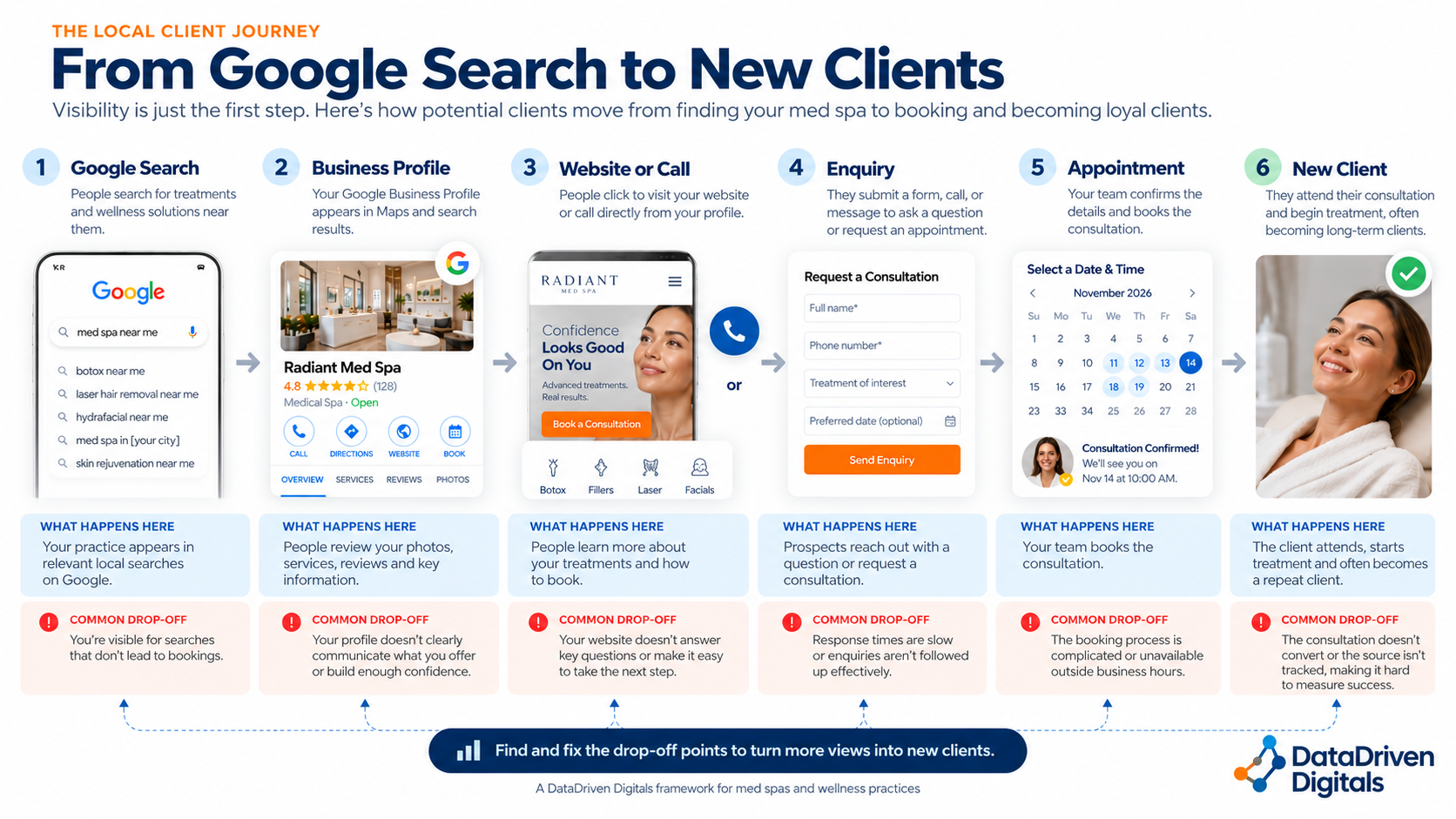
Where are potential clients dropping off?
Use the pattern you see to decide what to investigate next.
High views, few profile interactions: Check whether your listing appears for relevant services, and whether the profile communicates those services clearly.
Website clicks, few inquiries: Test treatment pages, mobile speed, contact buttons, and booking forms.
Call clicks, few conversations: Check missed calls, call handling, and business-hour coverage. A call click is not proof of a completed call.
inquiries, few appointments: Review response times, consultation availability, and how staff answer common questions.
Appointments, few new clients: Check cancellations, no-shows, repeat-client activity, and whether booking sources are recorded consistently.
These patterns suggest where to look. They do not prove what caused the problem.
A med spa example: the numbers look healthy until the booking stage
Consider this illustrative scenario, not a real client case study.
A med spa sees 2,000 profile views in a month, 90 website clicks, and 24 call-button clicks. Staff assume the profile produced 24 leads. A closer look shows that some calls were missed, some callers were existing clients, and several website visitors opened a treatment page without completing the booking form.
The profile is creating opportunities. The practice cannot yet say how many became new-client appointments.
A better monthly review would compare:
Profile interactions: 90 website clicks and 24 call-button clicks.
Confirmed contacts: answered calls and completed forms, without double-counting.
Qualified inquiries: people asking about a service the practice provides.
Consultations booked: confirmed appointments from those inquiries.
New clients: people who attended their first appointment.
Revenue: new-client revenue where the source can be reasonably supported.
These are separate measures. Adding them together would overstate results. Even with careful records, some people will interact through several channels before booking.
What should a med spa fix first?
Start with the problems closest to a booking. If calls are going unanswered, buying more visibility can increase missed opportunities. If clients reach a treatment page but cannot find the booking button, rewrite the page before producing more general blog content.
First, test the contact path. Call the number, open the booking link, and submit a test inquiry from a phone.
Next, check whether the profile and website describe the services people actually seek. Make the offer and the next step clear.
Then, strengthen trust. Use current photos, genuine reviews, transparent practitioner information, and practical answers about consultations.
Finally, revisit search reach. Once the path to booking works, identify relevant local searches where the practice is absent or hard to find.
This order will differ if the data shows a serious visibility problem. The point is to diagnose before adding work.
How to measure whether Google Maps is bringing in new clients
A simple tracking routine is enough to begin.
Each week, note profile views, call-button clicks, website clicks, and available booking interactions. Keep the same reporting period each time. Record answered calls, completed inquiries, consultations booked, attended first visits, and any known source in your practice's booking or customer system.
For website visits from your Business Profile, use a tagged website link where appropriate so analytics can identify that source. Check that the link still opens correctly. Website analytics will not capture every action someone takes directly from the profile.
When discussing performance, separate confirmed results from estimates. “We recorded eight new-client consultations that mentioned Google” is stronger than claiming every profile call click became a lead.
For a practical introduction to affordable measurement, see our article “Phone Call and Form Tracking Without Expensive Tools.”
A 30-day plan to improve calls and bookings
Week 1: Establish what is happening.
Record a baseline from Business Profile Performance. Test calls, website links, and booking forms. Review missed calls and response times. List your highest-value services and the searches that could lead to them.
Week 2: Remove obvious obstacles.
Correct service information, hours, and contact details. Make booking links easy to use on mobile. Give the team a clear process for returning missed calls and following up with inquiries.
Week 3: Help visitors decide.
Improve one priority service page. Explain what the consultation involves, who provides the service, how to ask questions, and how to book. Add useful, authentic photos. Request honest reviews from eligible clients using a consistent process.
Week 4: Compare and choose the next fix.
Review interactions and confirmed inquiries against the baseline. Look at booked consultations and first-time clients where records allow. Note what changed, what remains uncertain, and what you will test next.
Thirty days can reveal tracking problems and early changes in customer actions. It is not a reliable deadline for improved Google rankings or revenue. Continue measuring beyond the first month.
Frequently asked questions
Why does my Google Business Profile get views but no calls?
People may be researching rather than booking, the profile may not explain your services clearly, or they may choose a website or online booking route. Check search relevance, profile interactions, and actual contact records before deciding what to change.
How many Google Business Profile views should generate a call?
There is no dependable universal number. Search intent, location, competition, services, and booking options vary. Compare your own results over time and focus on qualified inquiries and confirmed appointments rather than a fixed views-to-calls target.
Can people book without calling from Google?
Yes. They may click through to your website, use an eligible booking link, or return later through another channel. A low call count does not always mean low demand.
Do Google reviews help generate inquiries?
Genuine reviews can help people judge a practice. Google's local ranking guidance also identifies review count and positive ratings as factors that can contribute to prominence. Reviews cannot replace clear services or a working booking process.
Should a med spa link its Business Profile to its homepage or a treatment page?
The main website link should point to an accurate, representative page for the business, usually its homepage or appropriate location page. Individual treatment pages can support people who need more detail. Use supported booking and other links for their intended purposes.
How can I tell whether Google Maps is bringing in new clients?
Compare Business Profile interactions with website analytics, call and inquiry records, and booking data. Ask new clients how they found the practice. Label uncertain sources honestly, because no single report captures every step.
Being found is the beginning
Your Google Business Profile may already be doing part of its job. It can put your practice in front of people who are considering care or treatment. The next question is whether those people can understand your services, feel confident about the practice, and take a simple next step.
Before spending more to attract attention, find out where interest stops turning into appointments.
DataDriven Digitals helps independent service businesses understand how they appear in search and what may be limiting inquiries. A Search Visibility Snapshot is a practical starting point for identifying where to look next.